← Back to selected projects Enterprise Java case study / 04

COLLABORATIVE JAKARTA EE PROJECT

SmartTech E-Business System

A server-rendered Jakarta EE application for authenticated access, customer records, tablet and smartwatch inventory, and stock-aware order processing.

I implemented Jakarta Faces presentation components, backing beans, the authenticated-page filter and the local email service that connect user workflows to the team’s EJB and persistence layers. I also refined the interface and corrected customer-profile navigation.

Project contribution

SmartTech was developed collaboratively for COIT20259 Applied Distributed Systems. My work focused on the presentation layer, authentication-related integration, local email delivery, customer navigation and interface consistency.

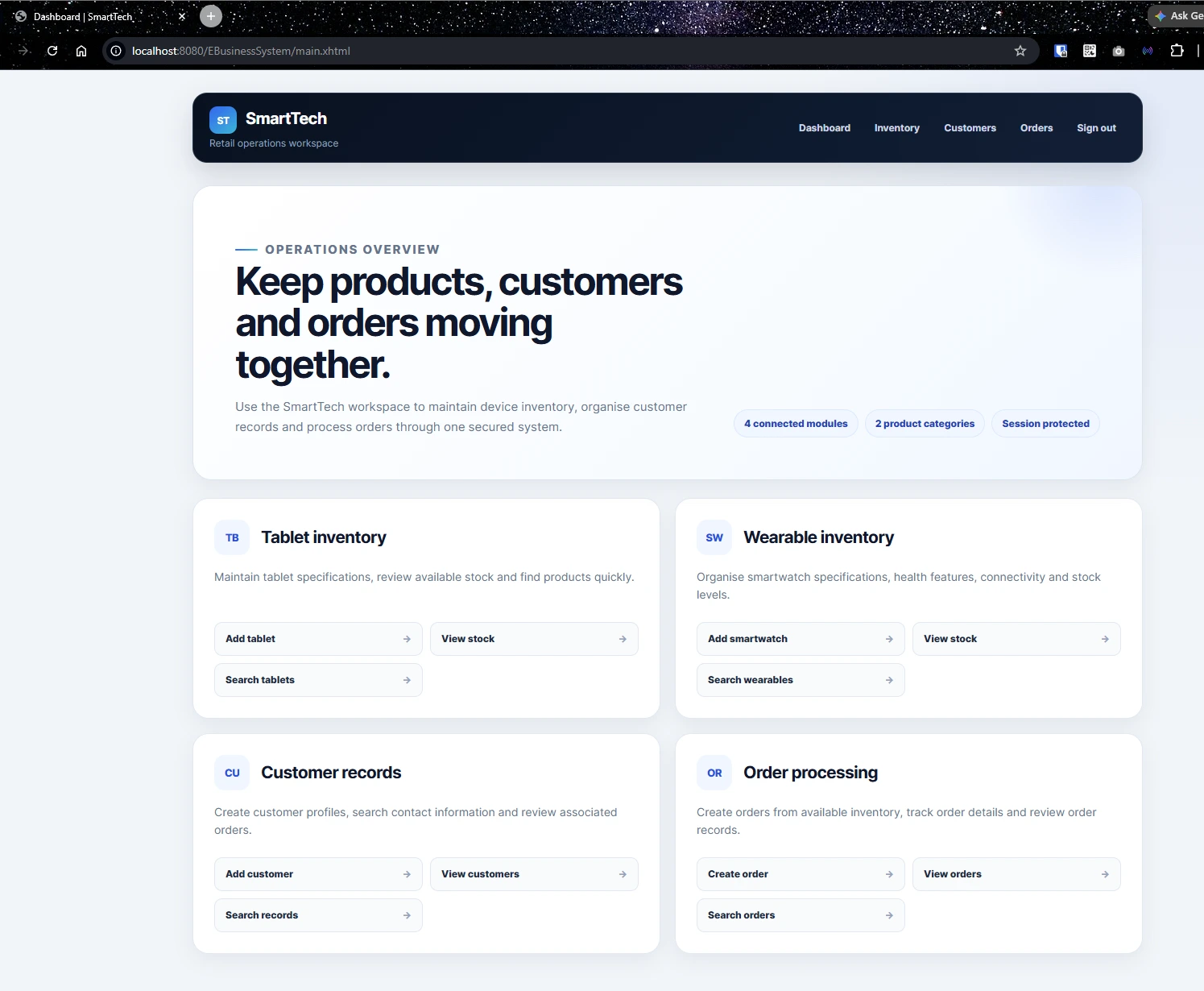
SmartTech operations dashboardAuthenticated workspace
SmartTech dashboard linking tablet inventory, smartwatch inventory, customer records and order processing
The dashboard provides entry points for inventory, customer and order-management workflows after authentication.

01 / CONTEXT

Manage related retail records through one authenticated application.

SmartTech connects customer records, two product categories and customer orders while keeping presentation, business and persistence responsibilities in separate application tiers.

The operational problem

A technology retailer needs customer information, product stock and order activity to work together. An order should refer to an existing customer and product, and it should not be created when the recorded stock is insufficient.

The internal management pages also require an authenticated session instead of relying only on hidden navigation links.

01

Related records

Customer, product and order data need to operate as connected workflows rather than isolated forms.

02

Stock-aware orders

Order creation checks recorded availability and updates the selected product quantity.

03

Authenticated pages

A servlet filter redirects unauthenticated requests away from internal management routes.

04

Layer integration

Jakarta Faces pages, EJB services and JPA entities must exchange data across a collaborative codebase.
02 / SYSTEM SCOPE

Four modules supporting a connected operating cycle.

The application is an internal retail-management workspace rather than a customer-facing online store.

01

Tablet inventory

Create, list and search tablet records while storing device specifications and stock quantities.

  • Product specifications
  • Stock records
  • Keyword filtering
02

Smartwatch inventory

Create, list and search smartwatch records with wearable attributes and stock information.

  • Wearable specifications
  • Stock records
  • Keyword filtering
03

Customer records

Create customer profiles, search contact information and open the selected customer by ID.

  • Customer creation
  • Directory and search
  • Selected profile view
04

Order processing

Select a customer and product, create an order and update the recorded product quantity.

  • Customer and product selection
  • Stock deduction and restoration
  • Order list, search and details

03 / ARCHITECTURE

Presentation, business and persistence concerns in three application tiers.

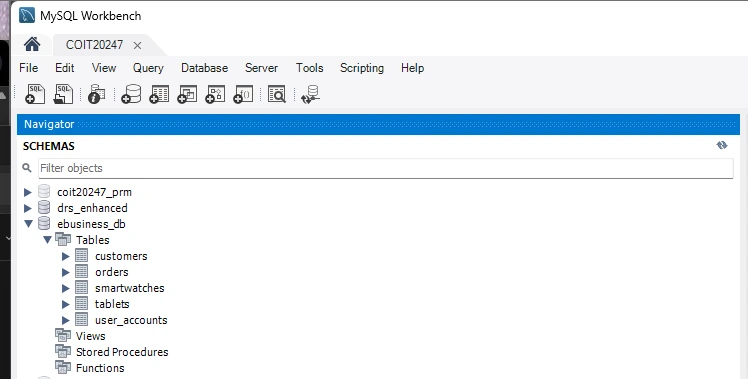
Jakarta Faces handles server-rendered pages and form interaction. Presentation beans call stateless EJB services, while Jakarta Persistence connects those services to MySQL through a JTA data source.

Application structureWAR deployment · GlassFish 7
Presentation tier Jakarta Faces and backing beans Facelets pages · form state · feedback · navigation · session access
Business tier Stateless EJB services Accounts · customers · products · orders · local email delivery
Persistence tier EclipseLink and MySQL User accounts · customers · tablets · smartwatches · orders
Application serverGlassFish 7Hosts the Jakarta EE WAR and the configured JDBC resource.
Development emailJakarta Mail + FakeSMTPSends verification and recovery codes through a local SMTP server.
Build workflowMaven + GitHub ActionsRuns mvn clean verify with Java 11 on pushes and pull requests to main.
  • Java 11
  • Jakarta EE 10
  • Jakarta Faces
  • EJB
  • Jakarta Persistence
  • EclipseLink
  • MySQL 8
  • GlassFish 7
  • Jakarta Mail
  • Maven

04 / MY CONTRIBUTION

Jakarta Faces implementation and application integration.

My work covered the application screens and the Java classes that prepare data for those screens, handle authentication-related navigation and connect user actions to the business tier.

I also implemented local email delivery for verification and recovery codes, corrected customer-profile routing and applied consistent responsive styling across the application.

01

Authentication interfaces

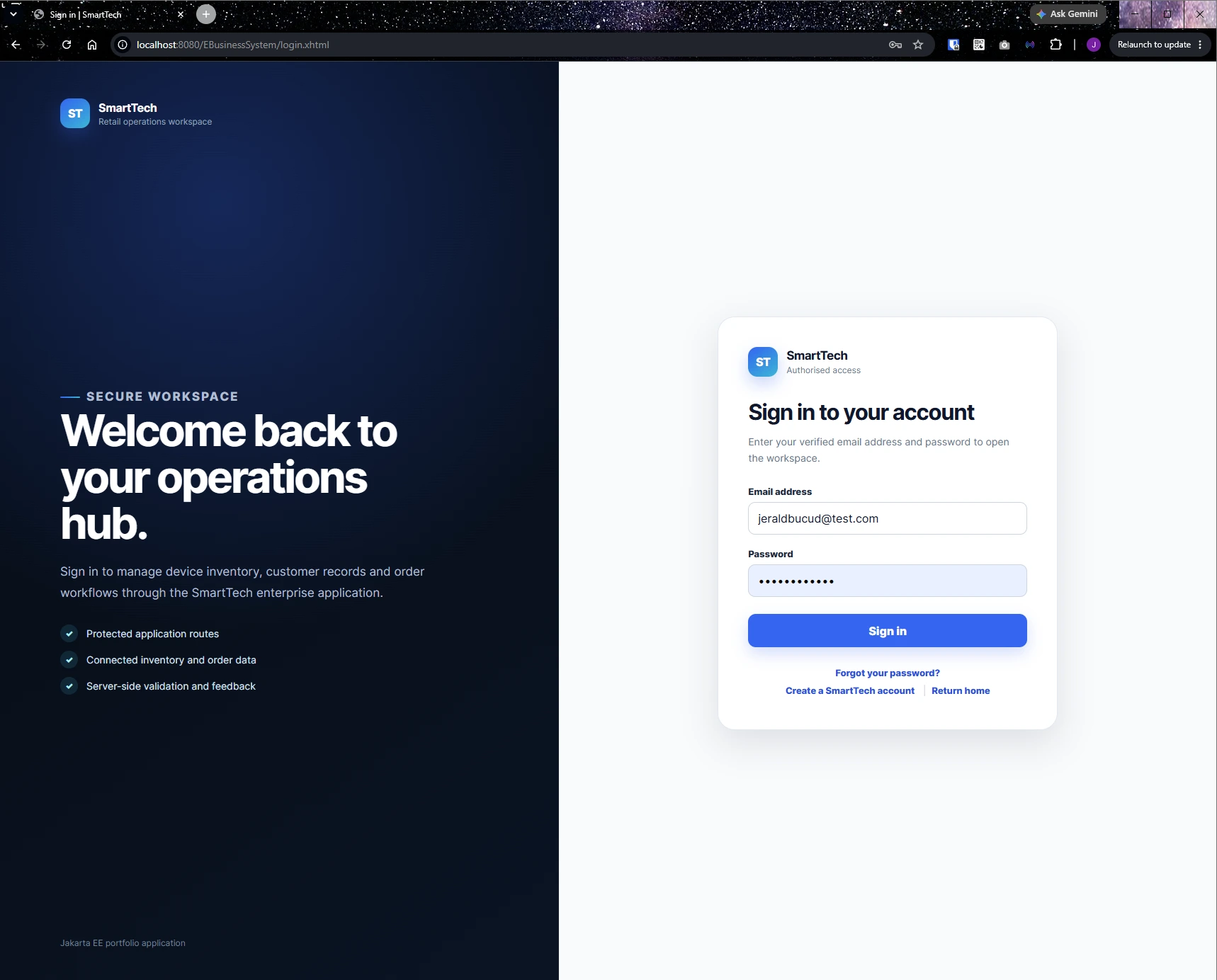
Implemented the Jakarta Faces backing bean and pages for registration, verification, login, account recovery, password reset and logout.

02

Authenticated-page filter

Added a servlet filter that allows public pages and static resources while redirecting unauthenticated management requests to the login page.

03

Management backing beans

Connected customer, tablet, smartwatch and order forms, tables and search views to the team’s business services.

04

Local email service

Implemented Jakarta Mail delivery for account-verification and recovery codes through a local FakeSMTP server.

05

Customer profile routing

Updated list and search links to pass the selected customer ID and load the matching profile record.

06

Interface consistency

Applied shared SmartTech branding, responsive layouts, navigation and feedback patterns across authentication and management pages.

05 / IMPLEMENTATION EVIDENCE

Requests crossing the presentation, business and persistence layers.

The following workflows show where the interface connects to application services and stored data.

Authenticated access

Check the session at the request boundary

The login filter distinguishes public pages and static resources from internal routes. Requests without an authenticated session are redirected to the login page.

Account lifecycle

Coordinate pages, EJB logic and local email

Registration, verification, login, recovery and password reset move through the authentication bean, account service, persisted account state and Jakarta Mail service.

Order and stock

Update inventory through the business tier

The order service calls the product service to deduct stock before persisting an order. Deleting the order restores the recorded quantity before the order is removed.

06 / ORDER WORKFLOW

Order creation produces a recorded inventory change.

The sequence connects a Jakarta Faces form to customer, product and order services.

  1. 01

    Select customer

    The form loads options from persisted customer records.

  2. 02

    Choose product type

    An AJAX update refreshes the product options for tablets or smartwatches.

  3. 03

    Submit quantity

    The backing bean parses the selected IDs and quantity, then creates an order object.

  4. 04

    Check available stock

    The product service confirms that the current stock is at least the requested quantity.

  5. 05

    Deduct and persist

    The stock value is changed before the order is persisted by the business service.

  6. 06

    Restore on deletion

    Deleting an order returns its quantity to the referenced product before removing the order record.

07 / INTERFACE AND DATA

Screens and data structures from the running application.

The public repository includes application screenshots and the local MySQL schema used by the academic build.

08 / APPLICATION IMPROVEMENTS

Usability and maintenance work completed after the assessment.

The original application functions were retained while the interface, navigation and public setup information were improved.

Interface and navigation

Consistent application experience

  • Shared SmartTech branding across Facelets pages
  • Responsive authentication and management layouts
  • Correct customer-profile routing by customer ID
  • Session-invalidating sign-out behaviour
Repository and build

Repeatable local setup

  • Documented GlassFish, MySQL and FakeSMTP requirements
  • Removed assessment-specific public setup details
  • Added application and schema screenshots
  • Configured Maven build checks through GitHub Actions
01AuthenticateRegistration, verification, login, recovery and logout flows.
02ManageCustomer, tablet, smartwatch and order interfaces.
03IntegrateBacking beans connected to EJB services and persisted data.
04RefineResponsive styling, navigation and customer-detail routing.
05BuildMaven packaging checks configured in GitHub Actions.

09 / OUTCOME

Experience across Jakarta Faces, EJB integration and relational workflows.

SmartTech demonstrates work in a layered Java web application: implementing server-rendered interfaces, connecting them to business services, managing authenticated sessions and coordinating customer, product and order data.

01Layered application

Presentation, business and persistence responsibilities are separated in the codebase.

02Connected operations

Customers, products, orders and stock changes operate through the same application.

03Authenticated sessions

Public account pages and session-protected management routes form one account flow.

04Collaborative delivery

The repository preserves the team history while documenting my implementation areas.

10 / CURRENT SCOPE

Specific constraints and next engineering priorities.

The application is complete for its academic scope. The following items would need attention before broader deployment.

Current constraints

  • Passwords are stored as unsalted SHA-512 digests rather than a password-hashing function with a work factor.
  • Verification and recovery codes use java.util.Random and the account model has no expiry or attempt-limit fields.
  • The login filter checks whether a session is authenticated; the stored group name is not used for role-based permissions.
  • Search functions load full record lists and filter them in presentation backing beans.
  • Order quantity is parsed from text, and the business layer does not explicitly reject zero or negative values.
  • Orders store customer and product IDs only and do not persist status, notes or timestamps.
  • The GitHub workflow runs Maven verification, but automated unit, integration and browser tests are not included.
  • Local execution requires GlassFish, MySQL and FakeSMTP; SMTP host and port values are fixed in the email service.

Next engineering steps

  • Adopt a salted password-hashing function with a configurable work factor.
  • Generate cryptographically secure, expiring verification and recovery codes with attempt limits.
  • Add role-based permissions for administrative and operational actions.
  • Validate positive order quantities and add integration tests for stock deduction, failure and restoration.
  • Move search criteria into database queries and add pagination for larger record sets.
  • Model customer and product relationships and persist a fuller order lifecycle.
  • Externalise SMTP settings and add automated unit, integration and browser-level tests.
Public repository

Source code, setup instructions and contribution history are available.

The repository contains the collaborative application, screenshots, local environment guide and Maven workflow. Commit history remains available for reviewing team contributions.

Explore the repository ↗

CASE STUDY 04

Review the source and local setup.