← Back to selected projects Software engineering case study / 03

ACADEMIC SOFTWARE ENGINEERING PROJECT

CrisisOps

A JavaFX disaster-response application developed through two individual assessment stages and expanded collaboratively into a MySQL-backed client-server system.

I completed the original requirements, system design and working JavaFX prototype. During the final group stage, I contributed JavaFX screens, role-aware navigation, client request integration, public alerts, shelters and administrator interfaces.

Project history and contribution

The original analysis, design and JavaFX prototype were completed individually. The final client-server application includes collaborative server, database, integration, testing and documentation work.

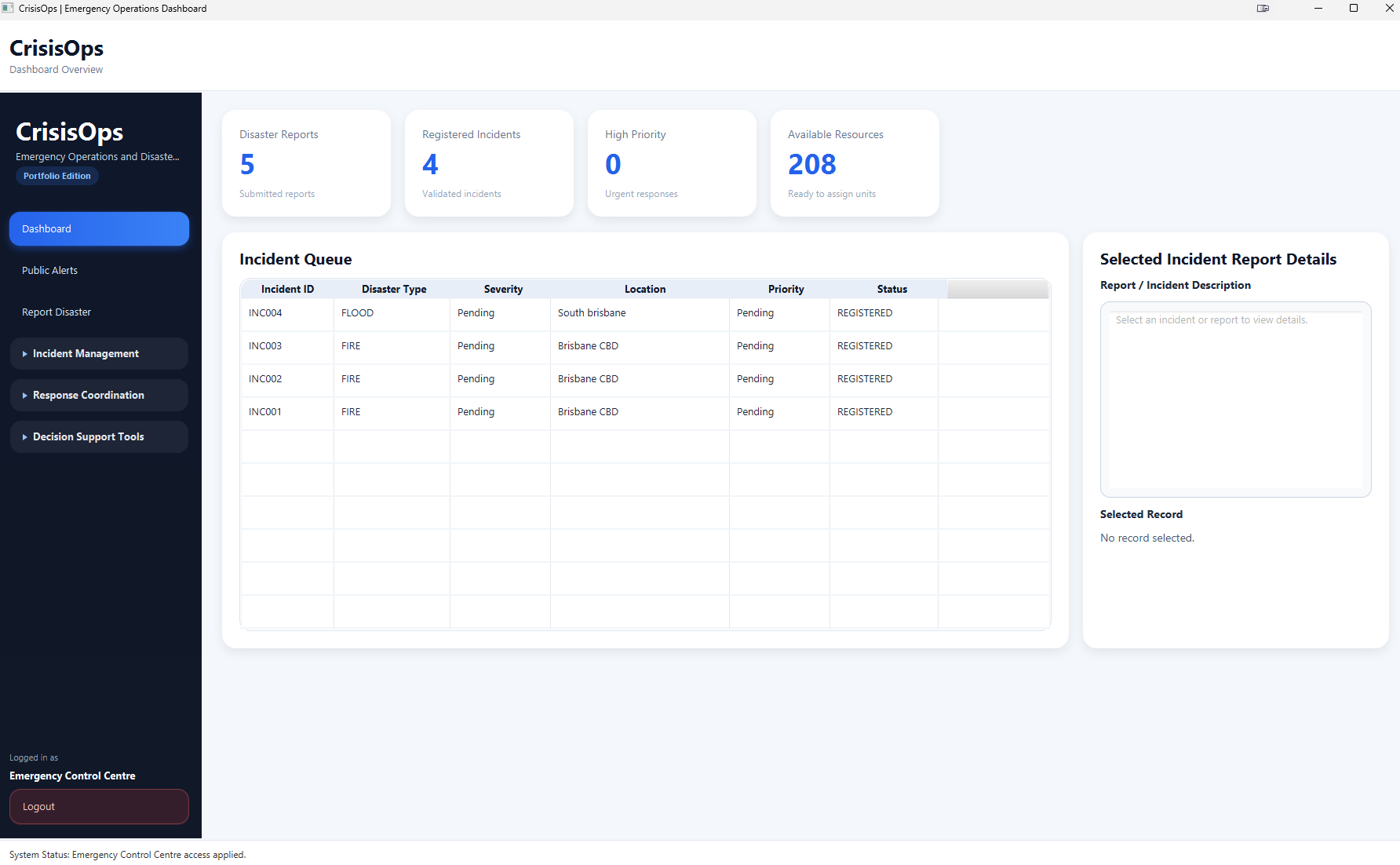
Completed academic application / Emergency Control CentreOperational dashboard
CrisisOps Emergency Control Centre dashboard showing disaster-response management modules
The Emergency Control Centre workspace combines incident registration, severity and priority assessment, resource coordination, shelters and public alerts.

01 / CONTEXT

Coordinate information across a disaster-response workflow.

CrisisOps models the movement from a public disaster report to incident assessment, resource dispatch, status updates and community information.

The system problem

Reports must be reviewed before they become structured incidents. Staff then need consistent severity and priority information, visibility of available resources and a record of response activity.

The application also separates community-facing functions from Emergency Control Centre and administrator work through role-aware JavaFX navigation.

01

Report validation

Public submissions need review before staff register an operational incident.

02

Priority decisions

A calculated risk score supports consistent priority recommendations using severity and affected-population data.

03

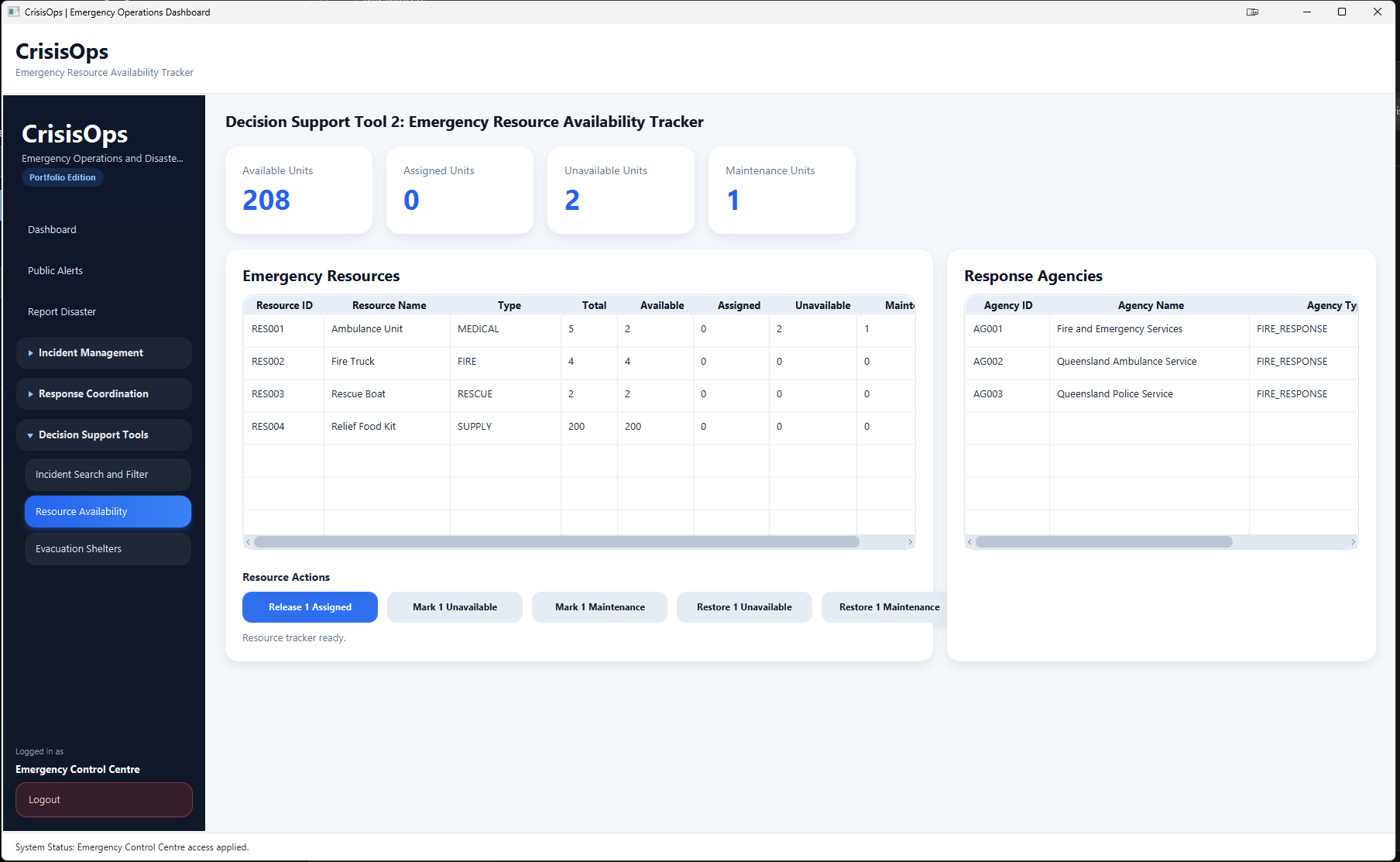
Resource visibility

Dispatch decisions depend on current available, assigned, unavailable and maintenance states.

04

User-specific work

Public users, Emergency Control Centre staff and administrators require different screens and actions.
02 / PROJECT EVOLUTION

Three stages from design to a database-backed application.

The first two assessment stages were completed individually. The final stage retained the JavaFX foundation and added collaborative client-server and database work.

01

Analysis and design

I defined the original system boundary, actors, requirements, use cases, interaction sequences and MVC direction.

  • Context model and system scope
  • Sixteen detailed use cases
  • Four use-case diagrams
  • Four sequence diagrams
02

Individual JavaFX prototype

I implemented the core workflow as a JavaFX desktop prototype with in-memory storage and JUnit 4 tests.

  • Report-to-dispatch workflow
  • Severity and priority logic
  • Resource availability tracker
  • Incident search and filtering
03

Collaborative expansion

The team expanded the prototype into a broader local client-server application.

  • Multi-threaded socket server
  • MySQL and DAO persistence
  • Login, registration and role-aware dashboards
  • Alerts, shelters and user administration

03 / CORE WORKFLOW

Turn a public report into a coordinated response record.

The six-step sequence established in the individual prototype remained central to the completed academic application.

  1. 01

    Report disaster

    A public user submits a disaster or hazard report.

  2. 02

    Register incident

    Emergency Control Centre staff validate the report and create an incident record.

  3. 03

    Assess severity

    Staff record severity and the number of affected people.

  4. 04

    Recommend priority

    The application calculates a risk score and recommends a response priority.

  5. 05

    Dispatch resources

    Available resources are selected and response activity is recorded.

  6. 06

    Update status

    Staff maintain incident progress and publish relevant community information.

04 / ACCESS MODEL

Role-aware navigation for three user groups.

After a successful login, the JavaFX client stores the returned role and shows or hides dashboard functions for that user type.

01

Public user

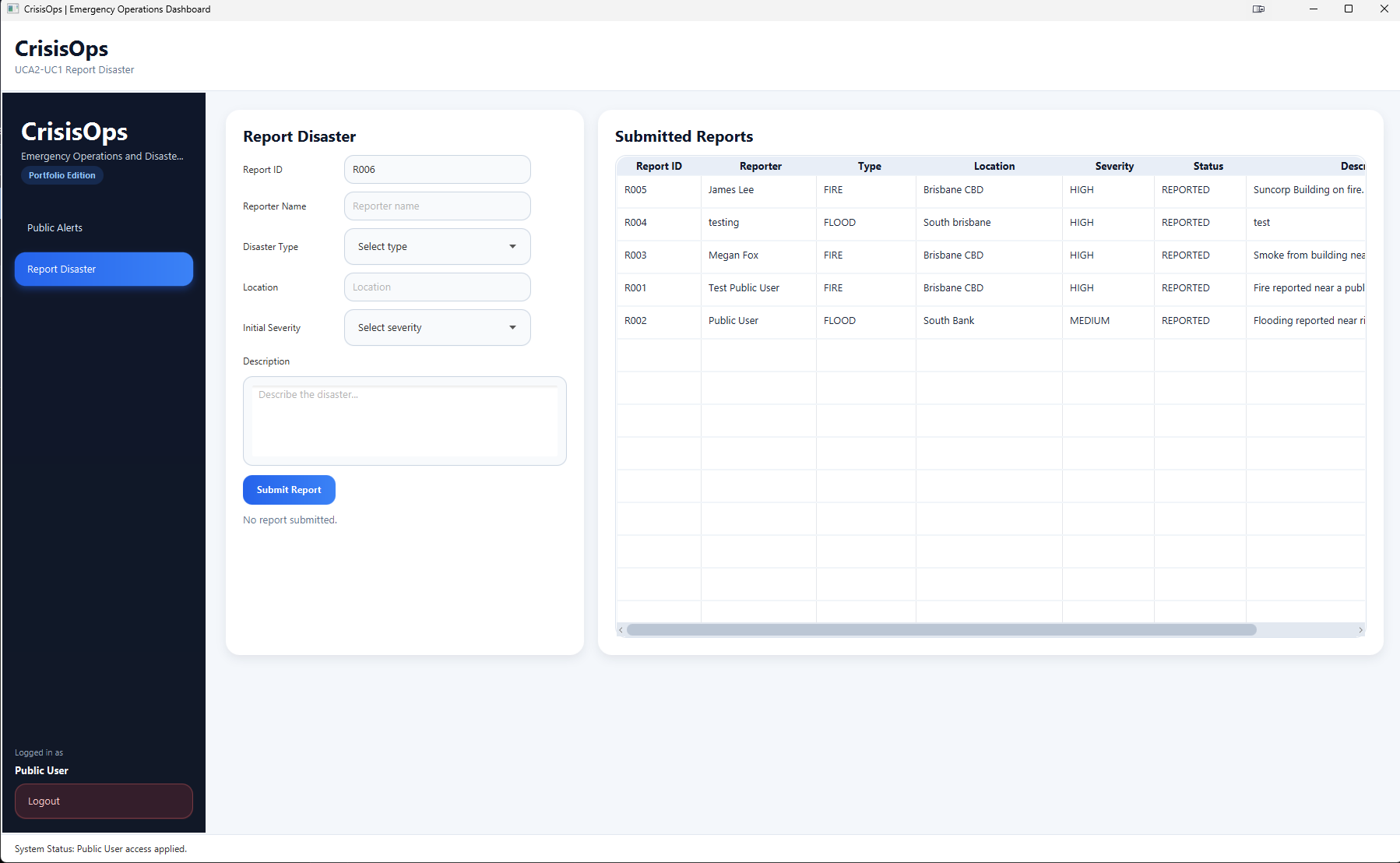
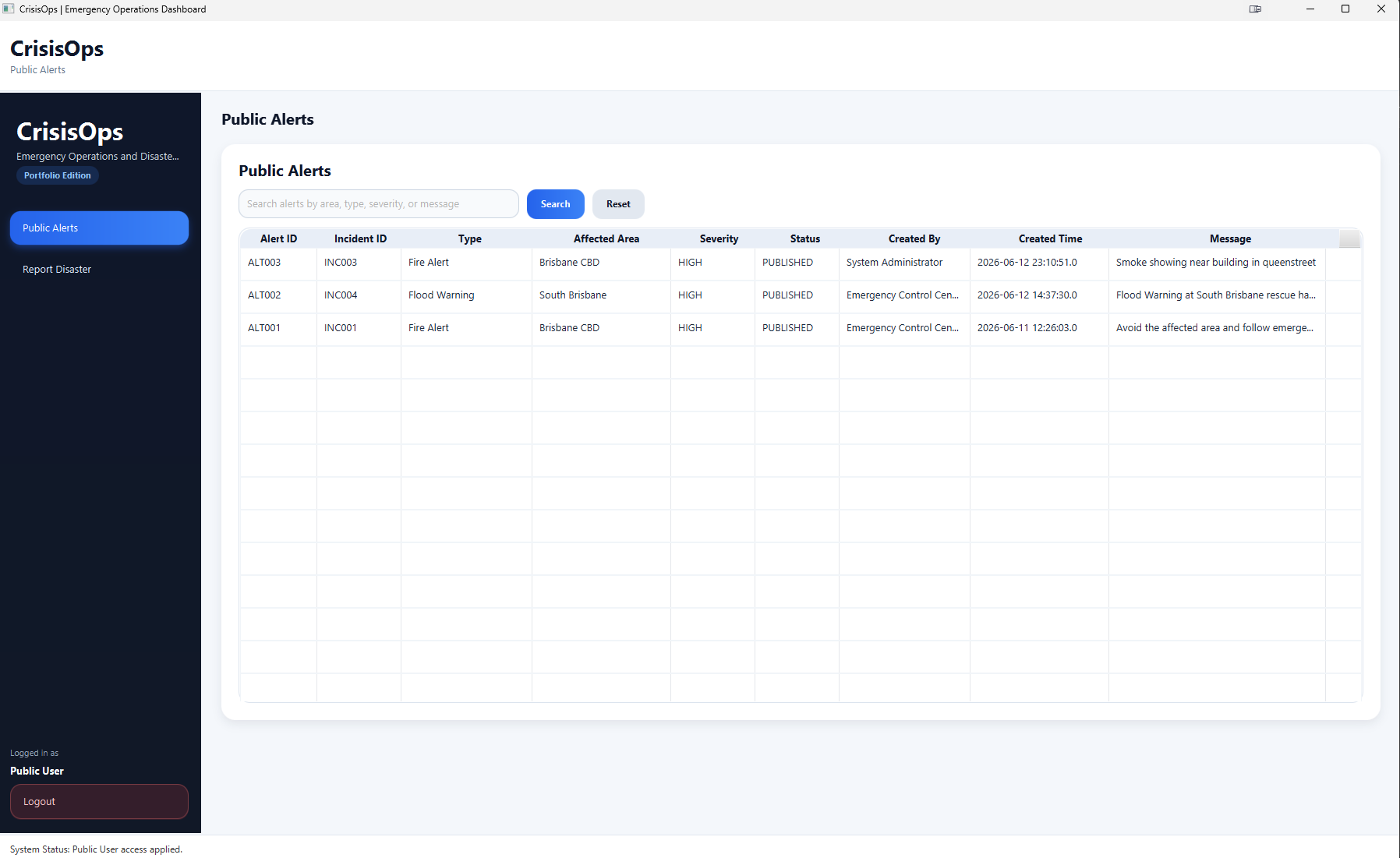
Community-facing access for account registration, disaster reporting and published alerts.

  • Registration and sign-in
  • Disaster reporting
  • Published alert access
02

Emergency Control Centre

Operational screens covering incident assessment, resource coordination, shelters and alerts.

  • Incidents, severity and priority
  • Resources and dispatch
  • Shelters and public alerts
03

System administrator

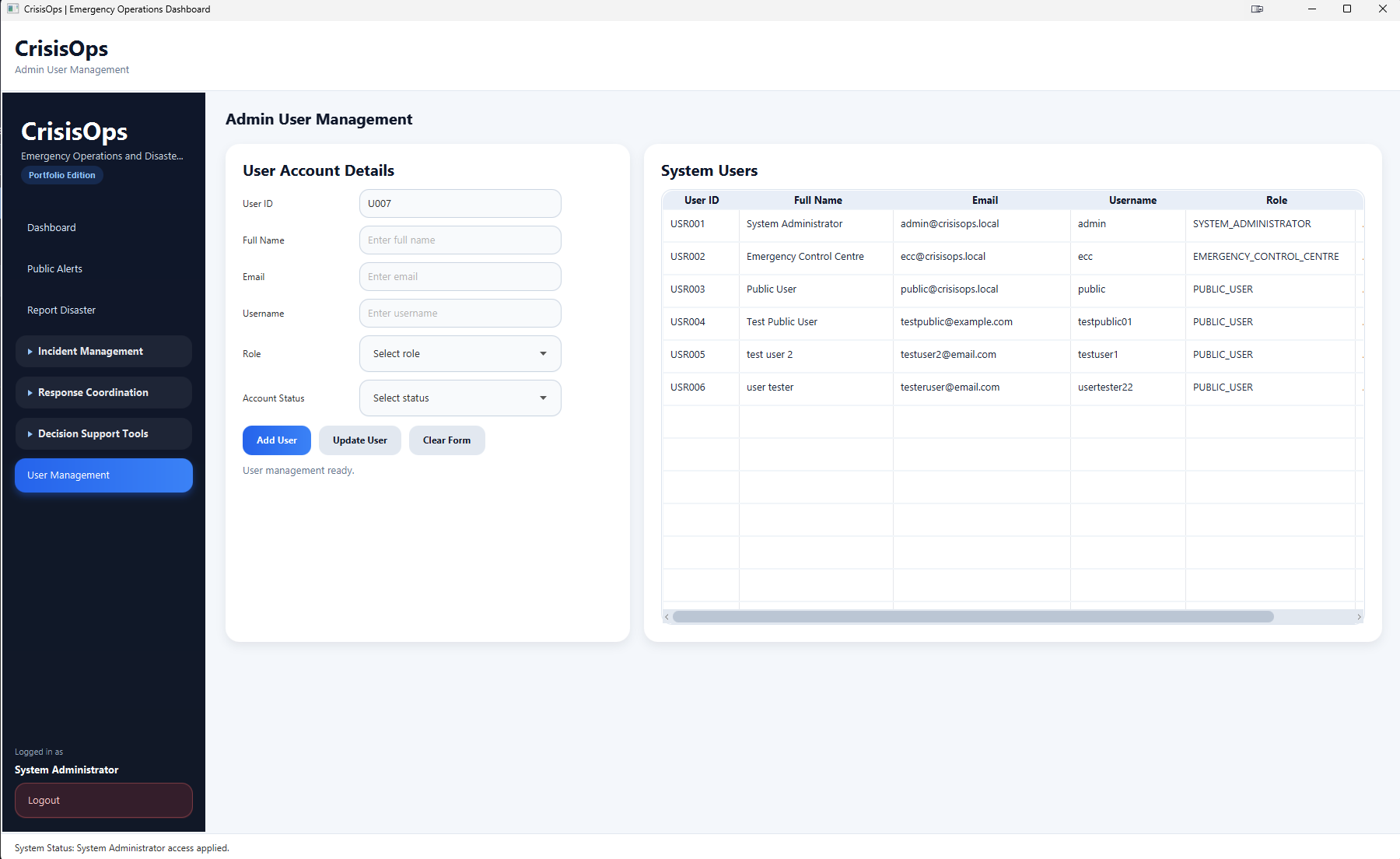
Access to the operational workspace with an additional user-management interface.

  • Operational dashboard access
  • User account creation
  • Account status and role fields
Security boundary

Role separation is implemented in the JavaFX client. The socket server does not issue session tokens or enforce role checks for every request, so this is an academic access model rather than production-grade authorisation.

05 / ARCHITECTURE

A JavaFX client connected to a multi-threaded Java server.

The desktop client sends serialised requests over sockets. The server routes each request, calls DAO classes and returns a response from the MySQL-backed application.

Completed academic architectureLocal client-server deployment
Desktop client JavaFX and FXML Role-aware screens · form interaction · local session state · request creation
Application server Multi-threaded Java server One client handler thread per accepted connection · request routing · application logic
Persistence MySQL database Users · reports · incidents · resources · dispatch · alerts · shelters · audit records
Interface structureMVC-style organisationFXML views and controllers separate interface concerns from model and service behaviour.
Data accessDAO classesDatabase operations are grouped behind dedicated data-access components.
ConfigurationExternal database credentialsLocal credentials are supplied through environment variables or Java system properties.
  • Java 17
  • JavaFX
  • FXML
  • CSS
  • Java sockets
  • Multi-threading
  • MySQL
  • JDBC
  • DAO
  • JUnit 4
  • Apache Ant
  • NetBeans

06 / MY CONTRIBUTION

Individual system development followed by JavaFX integration work.

I completed the original analysis, design and working JavaFX prototype individually. That application was selected as the foundation for the final group assessment.

During the collaborative stage, my work centred on JavaFX interfaces, role-aware navigation, frontend request components and connecting screens to backend request and response flows.

01

Requirements and design

Defined the original system boundary, actors, requirements, use cases, sequence flows and MVC direction.

02

Individual JavaFX prototype

Implemented the report, incident registration, severity, priority, dispatch, status, resource-tracking and search workflows.

03

Decision-support logic

Built the resource-availability tracker and priority-recommendation behaviour based on severity and affected population.

04

Role-aware interfaces

Contributed login, public registration, dashboards, alerts, shelters and administrator user-management screens.

05

Client integration

Prepared frontend request components and connected JavaFX screens to server responses for selected workflows.

06

Repository preparation

Removed private database credentials, applied CrisisOps branding and organised setup, attribution and project-evolution documentation.

07 / INTERFACE GALLERY

Disaster-response functions across role-aware JavaFX screens.

The repository includes screenshots of the main public, Emergency Control Centre and administrator workflows.

08 / TESTING EVIDENCE

Current repository JUnit test results.

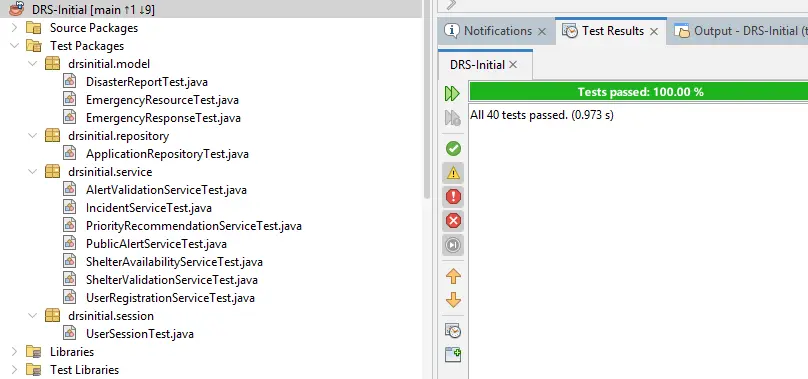
A full local JUnit 4 run of the current CrisisOps repository completed with 40 tests passing across selected models, services, validation rules, session state and repository behaviour.

40 Current repository tests passed

The complete project test suite was run locally from the current CrisisOps repository. The result is presented as local JUnit evidence rather than an automated continuous-integration result.

Models

Domain-object behaviour

Tests cover disaster reports, emergency resources and emergency responses.

Services

Selected business rules

Service tests cover incidents, priority recommendations, alerts, shelters and registration.

Validation

Input constraints

Alert and shelter validation tests exercise selected rules outside the JavaFX interface.

State and data

Session and repository behaviour

The suite includes tests for user-session state and the in-memory application repository.

Current CrisisOps repository40 tests passed
Current CrisisOps JUnit result showing 40 tests passing
The screenshot records a successful local run of the current repository's complete JUnit 4 test suite.

09 / ENGINEERING DECISIONS

Technical choices for workflow clarity and separation.

The design connects interface structure, business rules, request handling and persistence while retaining the constraints of the submitted academic application.

Workflow modelling

Follow the operational sequence

The interface progresses from report and validation through assessment, dispatch and status updates.

Role-aware interface

Show functions by user type

The JavaFX dashboard changes its visible navigation for public, operational and administrator roles.

Data access

Keep SQL behind DAO classes

Database operations are grouped in dedicated data-access components rather than embedded in interface controllers.

Concurrency

Handle each connection on a thread

The server creates a client handler and a new thread for each accepted socket connection.

10 / CURRENT SCOPE

A completed academic application with clear modernisation priorities.

CrisisOps demonstrates requirements engineering, JavaFX development, decision-support logic, socket communication, relational persistence, testing and collaborative integration.

01Individual foundation

The original requirements, architecture and working prototype establish my personal contribution.

02Collaborative delivery

The final stage expanded the prototype with a server, database and broader integrated workflows.

03Technical breadth

The application connects JavaFX, sockets, threads, JDBC, DAO classes, MySQL and JUnit.

04Public evidence

The repository provides source code, setup guidance, screenshots, contribution history and known constraints.

Current constraints

  • The socket protocol has no session token or per-request role authorisation.
  • Local client-server traffic does not use TLS.
  • Demonstration accounts and password compatibility remain from the academic build.
  • User-account update handling is not implemented on the server.
  • The Ant and NetBeans project requires local JavaFX and MySQL configuration.
  • No packaged release or automated CI workflow is included.

Next engineering steps

  • Migrate the build to Maven or Gradle.
  • Add GitHub Actions for automated build and test verification.
  • Introduce authenticated sessions, request-level authorisation and encrypted communication.
  • Complete account-update behaviour and add integration tests around server requests.
  • Package the JavaFX application for simpler installation.

CASE STUDY 03

Review the source and setup documentation.